 gilvt
gilvt
Everything happens in one window
A complete terminal for your own work, a live view of every agent, and one-click review and editing of what they changed. Here is each piece in detail.
A real terminal first
gilvt is a complete everyday terminal. Use it for everything, with or without agents; collapse both side columns (⌘B, ⌘I) and it is just a terminal.
- Tabs and splits: ⌘T ⌘D ⌘⇧D, move and resize panes from the keyboard, maximize one with ⌘⇧⏎.
- GPU rendering, true color, the Kitty keyboard protocol, input methods, find and deep scrollback.
- Shell integration for zsh, bash and fish: new panes keep your directory, and commands are marked so you can jump between them. Your rc files are not touched.
- ⌘-click a path such as
src/main.rs:42to preview it, or a link to open it. - Windows, tabs, splits and directories come back after a quit or a crash; agent sessions wait under “Pending resume”.
- Closing a pane, tab or window that would interrupt an agent asks first.

Know who needs you, without looking
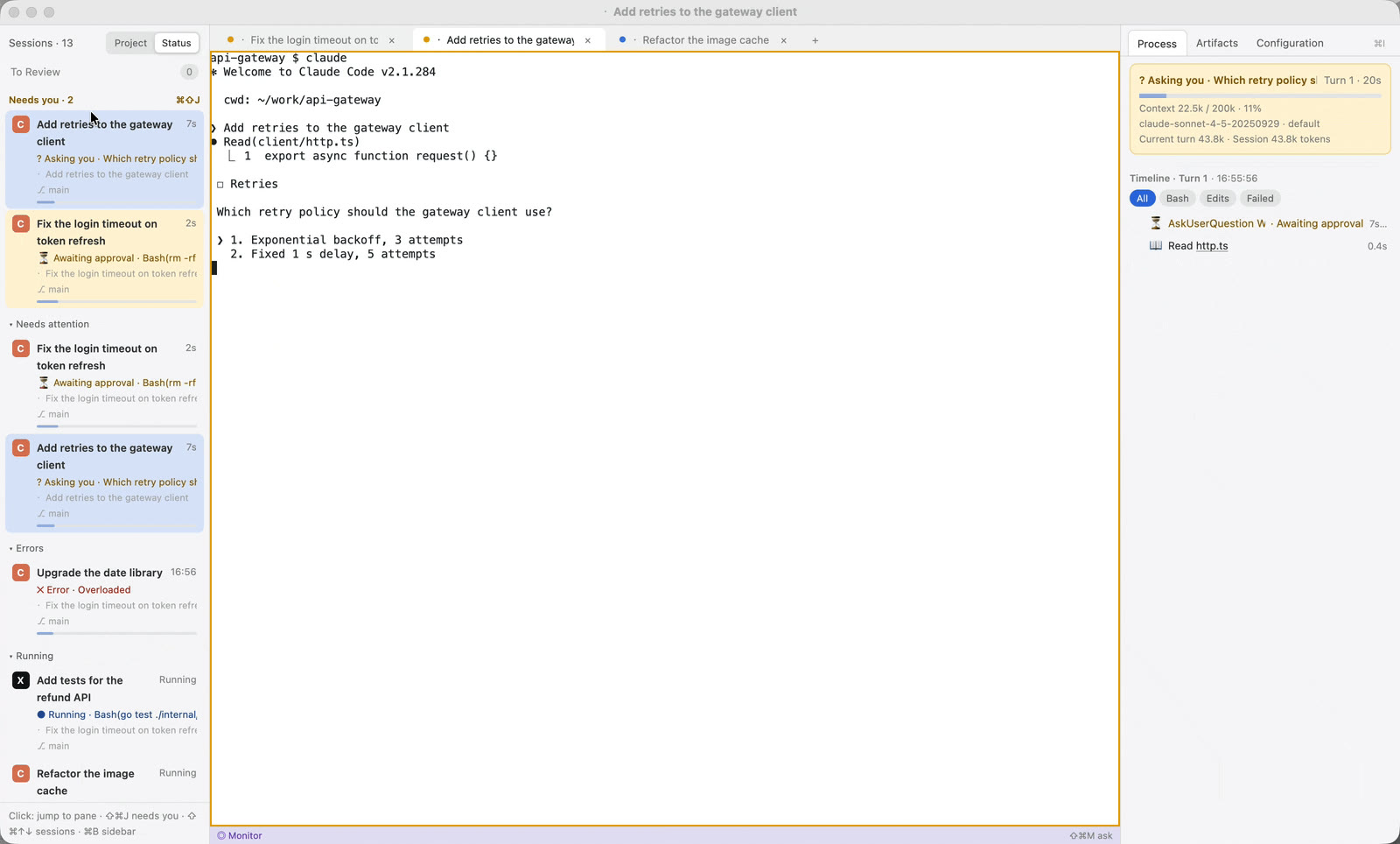
Run claude or codex in any pane. gilvt recognizes it and follows its state in real time; you keep working in the agent's own interface.
- The sidebar lists every session, with “Needs you” pinned on top: waiting for approval or asking a question, longest wait first.
- Each row shows the current action, location, git branch and changes, and how full the context is.
- ⌘⇧J cycles through the sessions that need you, across tabs and windows. ⌘⇧↑ ⌘⇧↓ walk the list.
- Four colors on pane borders and tab dots: yellow needs you, red error, blue running, green done and unseen.
- System notifications and a Dock badge reach you in other apps; click a notification to land in the right pane.
What the agent did, turn by turn
The inspector on the right follows the focused pane. It only shows and navigates; it never types into the agent.
- Process ⌥⌘1: status card, TODO list and a timeline of every command and edit. Failed commands show their key error lines. Click a row and the terminal scrolls back to it.
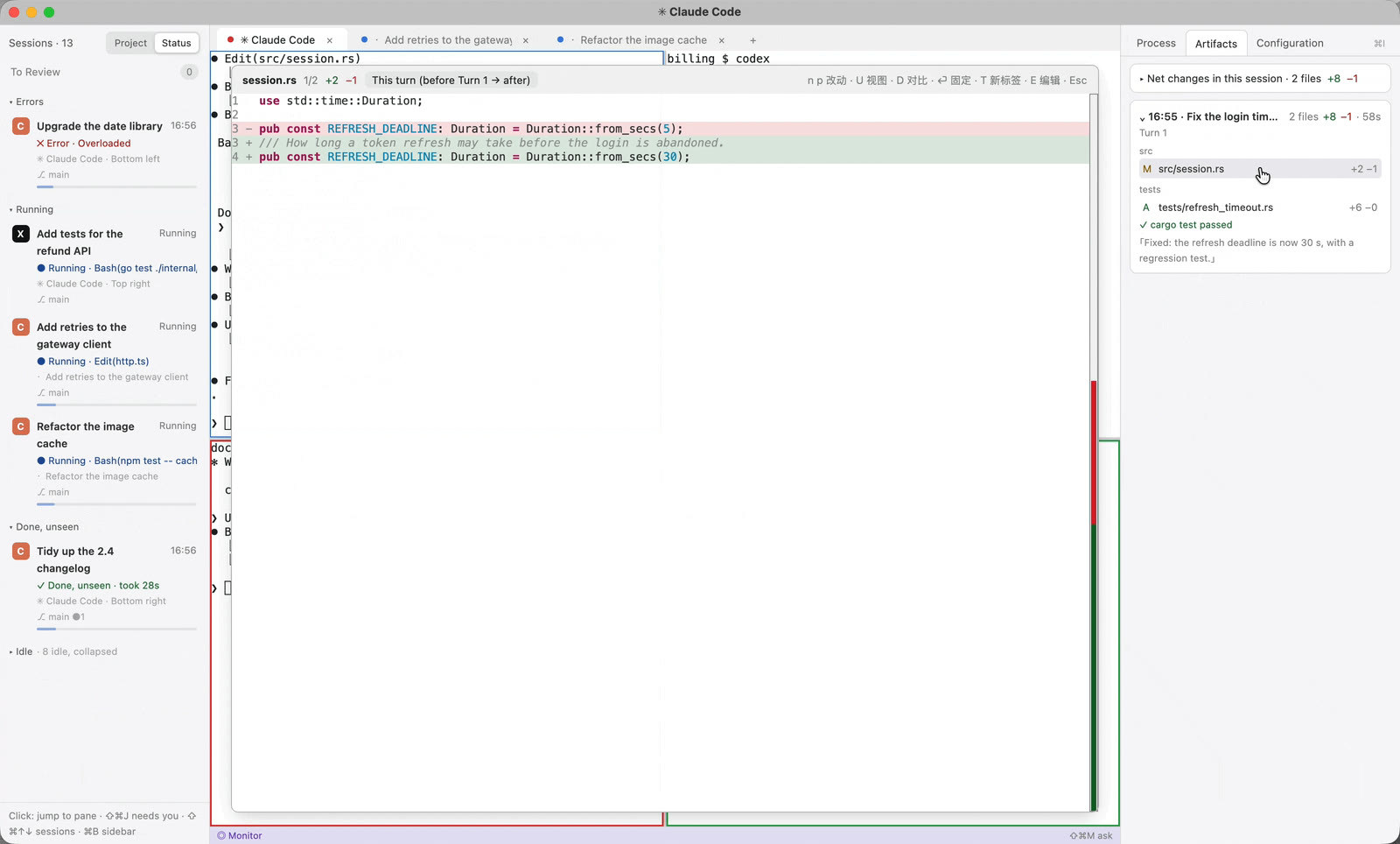
- Artifacts ⌥⌘2: one card per task with the files it changed,
+a −b, and whether the tests passed. Open any file for its “this turn” diff. - Configuration ⌥⌘3: the session's model, permissions, MCP servers, hooks, skills and memory files, read-only and redacted.
Click to review. Fix it in place.
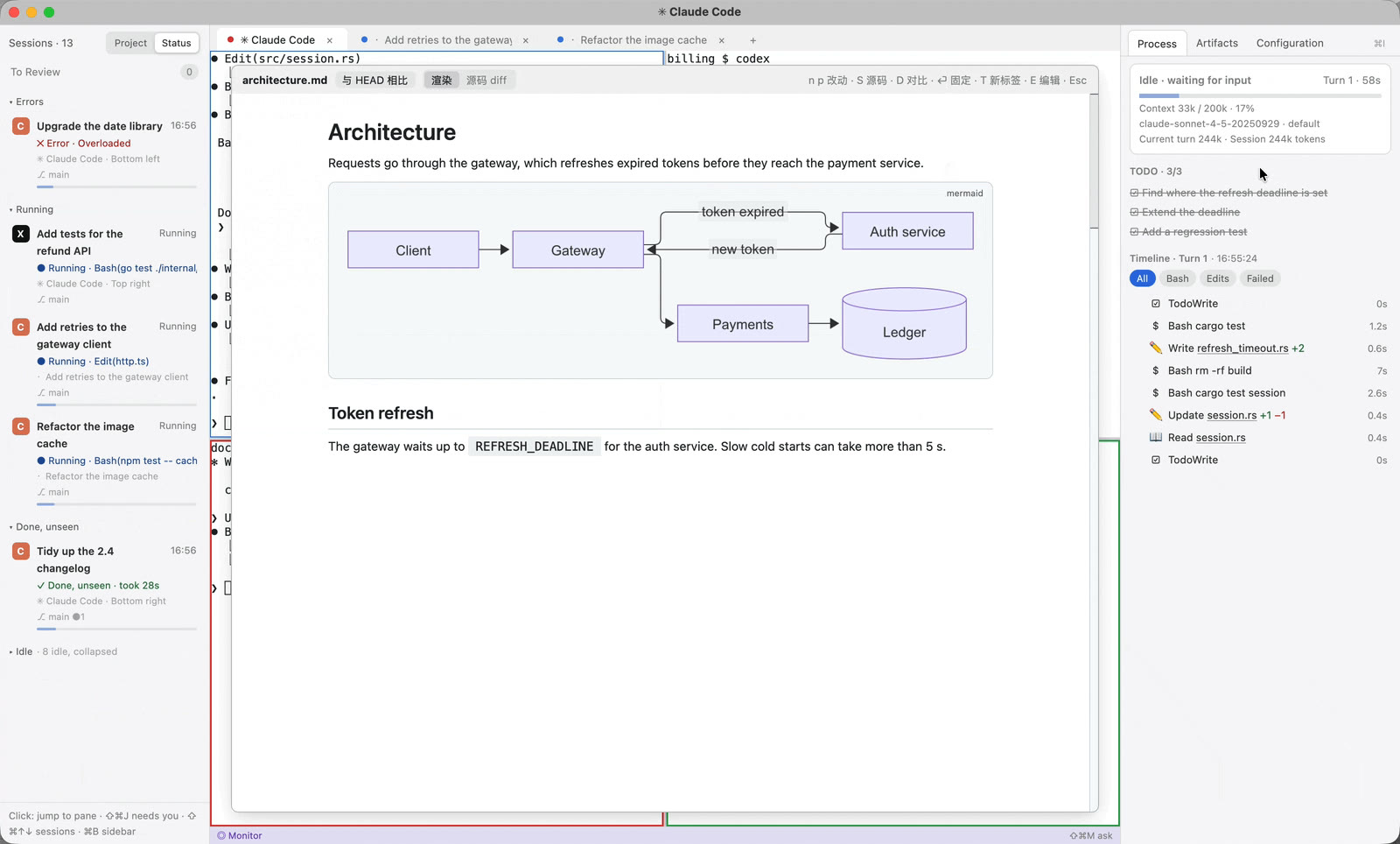
Every file an agent touches is one click from a readable diff, and one more key from an editor. No switching to another app.
- Quick Look: syntax-highlighted, word-level diffs against HEAD or a branch; side by side or unified; pin it as a pane that refreshes on save.
- Markdown is rendered with change markers, and Mermaid diagrams are drawn offline.
- Press E to edit in the built-in editor: syntax highlighting, input methods, live preview (⌘⇧V), and no silent overwrite when the agent changes the file under you.
- ⌘P fuzzy-finds any file in the repository; drop a file from Finder to preview it or hand it to the agent.
- From any shell,
gilvt view file:lineandgilvt diffopen previews; agents can use them too, to put a file in front of you.
Pick up any session, review the finished ones
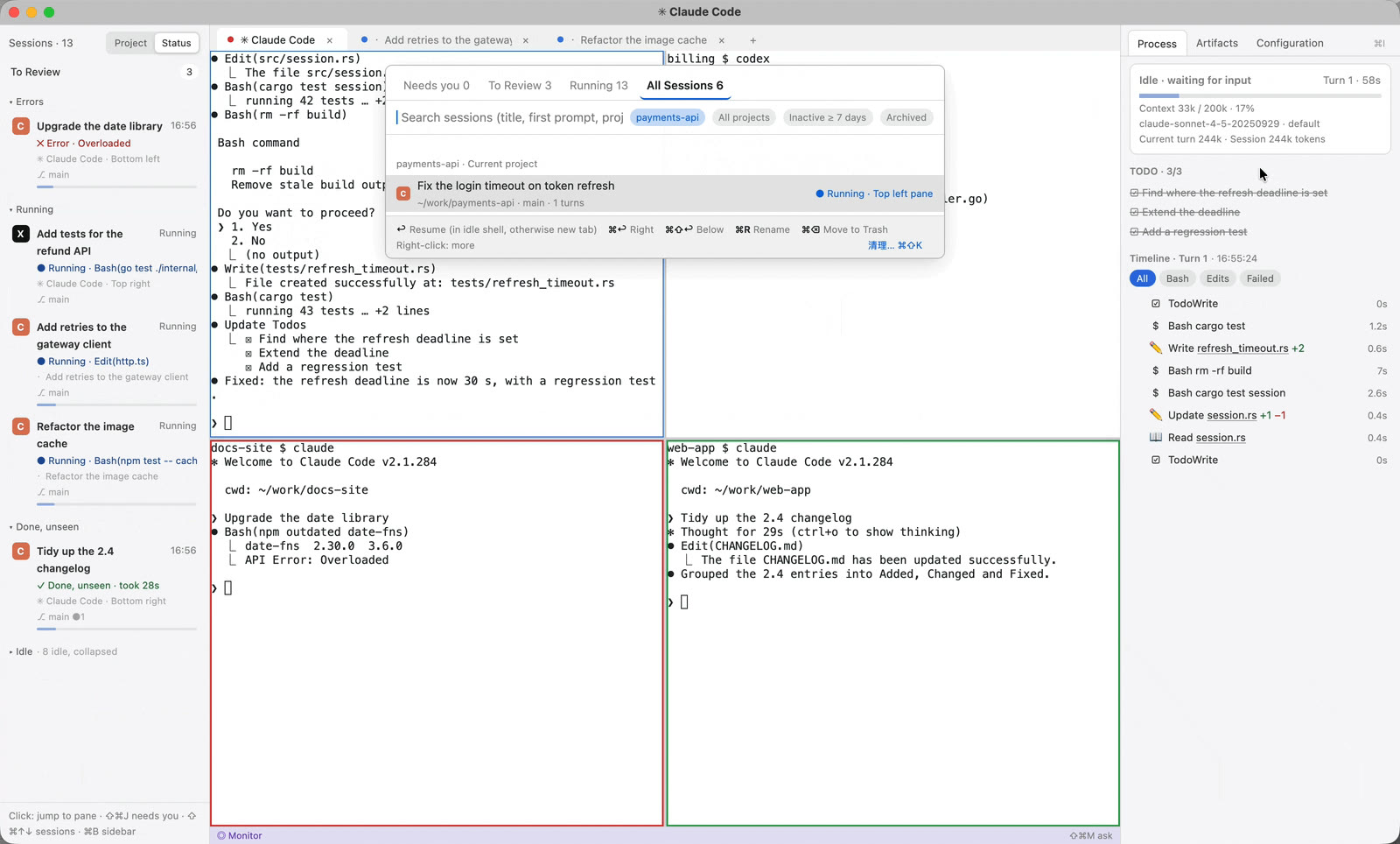
The Session Center (⌘⇧R) covers every Claude Code and Codex session on your Mac, not only the open ones.
- Search by title, first prompt, project or directory; resume in place, in a new tab or in a split.
- “To Review” queues every finished turn you haven't looked at, failures first, and shows it read-only without starting the agent.
- Rename, archive, and move old sessions to the Trash; a cleanup wizard (⌘⇧K) handles them in bulk.
- New Agent (⌘⇧N): pick the agent, directory, task, model and permission mode, optionally in a fresh git worktree.
The big picture, and someone to ask
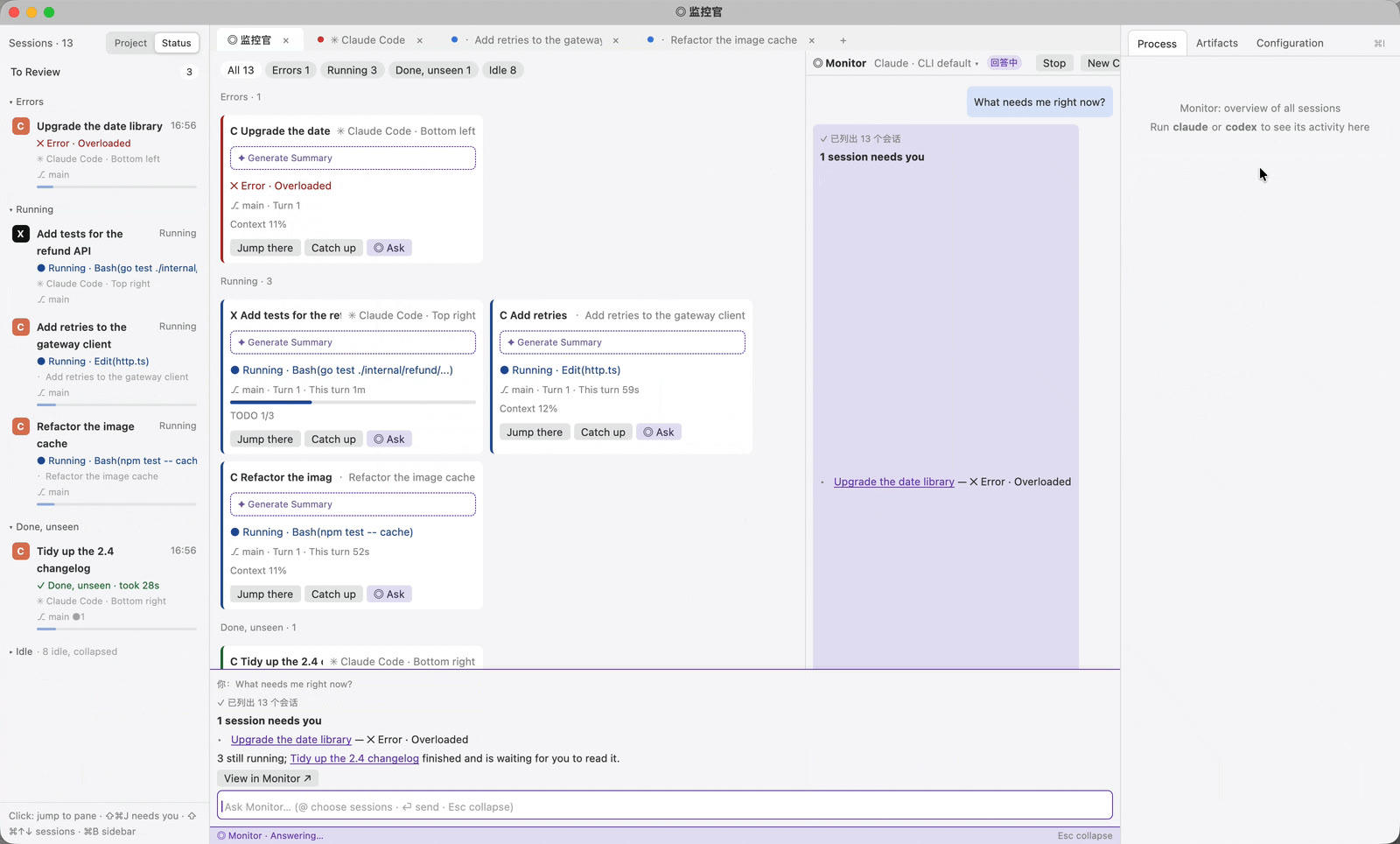
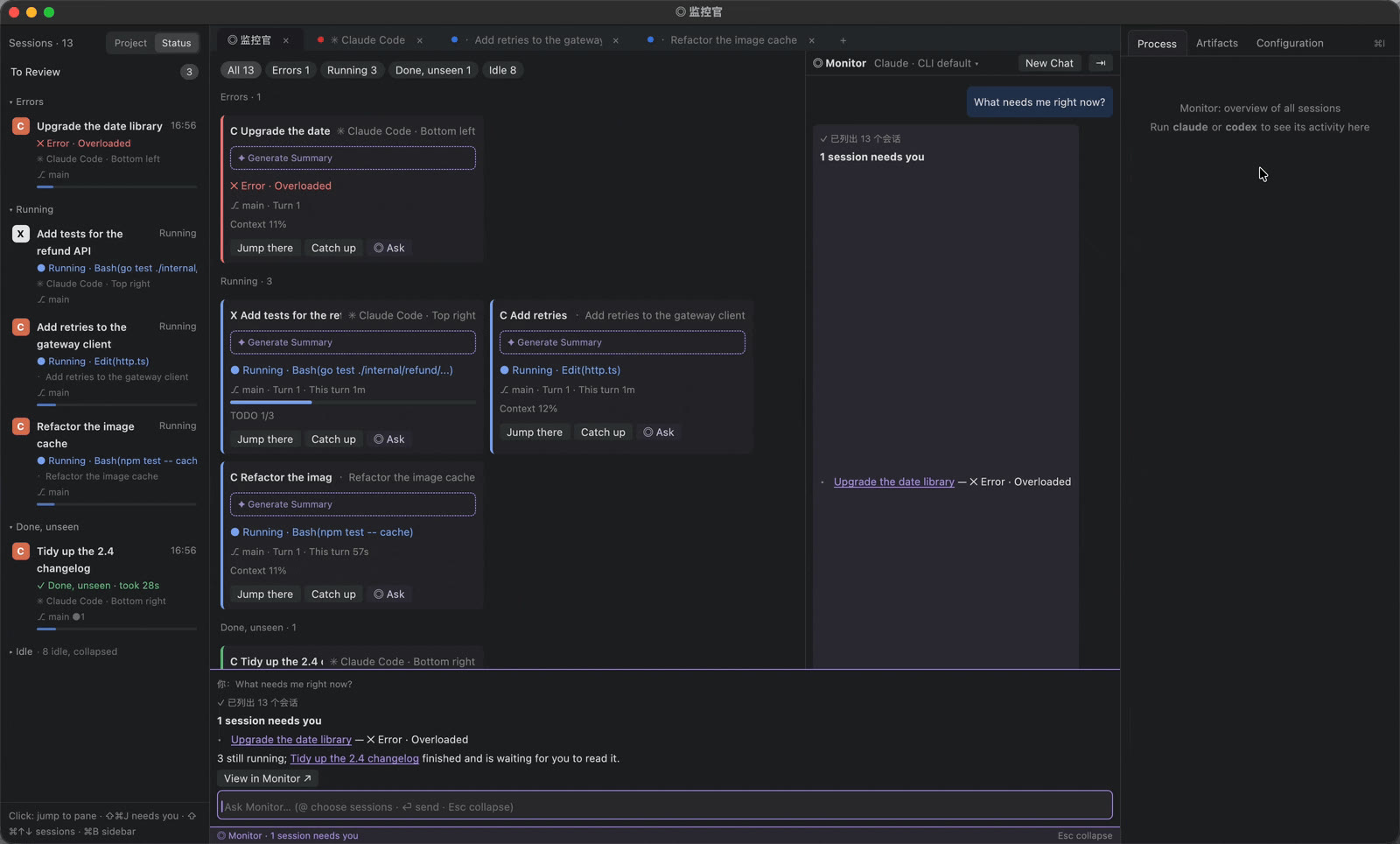
The Monitor (⌘⇧O) lays out every agent and terminal from every window as cards, grouped by state, so you can catch up without visiting each one.
- Cards show the current action, the turn, lines changed and TODO progress; terminal cards show the running or last command.
- Optional AI summaries of each session's goal and progress, generated by your own local
claudeorcodex. Off by default. - Ask “what needs me?” in the chat panel, or from the command bar (⌘⇧M) at the bottom of any tab. Answers link straight to the sessions.
- Read-only by design, also over MCP (
gilvt mcp): it can look, never type.
Make it yours
- 725 built-in themes, plus your own; pick one for light and one for dark, and the window frame and state colors follow.
- Settings (⌘,) apply instantly and are written back to
config.tomlwith your comments kept; edits to the file reload live. - Interface in English or Simplified Chinese, switchable without a restart.
Built to be trusted with your work
- Agents stay in their native TUI. gilvt observes and moves focus; it never answers for you.
- Your configuration is untouched: hooks are injected at launch, not written into your rc files,
~/.claudeor~/.codex. - When something can't be parsed, gilvt falls back to a lighter mode or a plain terminal. Input and output always work.
- No telemetry. The only request of its own is an update check you can turn off; updates install when you quit, so agents are never cut off. Privacy