 gilvt
Short version: in Terminal.app and most other terminals Claude Code shows no desktop notification by default. Set Local notifications in /config to the terminal bell, or add a Notification hook (approvals, idle prompts) and a Stop hook (finished turns) that post a macOS notification. For Codex, use [tui] notifications or the notify program. With several sessions, you also need to know which one is asking and get there in one step.
What is worth a notification
Not every event deserves an interruption. In practice four are worth knowing about while you are in another app:
- Waiting for approval or asking a question — the session is blocked on you. Notify immediately.
- An error — an API error or a failed turn. Notify, but quietly.
- A long turn finished — useful for a 10-minute refactor, noise for a 5-second answer.
- The context window is nearly full — once is enough.
Option 1: Claude Code's built-in setting
Claude Code shows desktop notifications on its own only in iTerm2, Ghostty and Kitty. Everywhere else, open /config in Claude Code and change Local notifications (the preferredNotifChannel setting). terminal_bell rings the terminal bell, which most terminals turn into a sound or a bouncing Dock icon. The same setting in ~/.claude/settings.json:
{
  "preferredNotifChannel": "terminal_bell"
}
The other values are auto (the default), iterm2, iterm2_with_bell, kitty, ghostty and notifications_disabled. A bell tells you something happened, not what or where.
Option 2: hooks that post a macOS notification
Claude Code runs hooks on events. Two matter here:
Notificationfires when a permission prompt has been waiting for about six seconds, when Claude finished answering about a minute ago and you have not typed since, and for a few other prompts. It fires even when desktop notifications are off.Stopfires when Claude finishes responding (not when you interrupt it).
Put them in ~/.claude/settings.json to cover every project:
{
  "hooks": {
    "Notification": [
      { "hooks": [ { "type": "command",
        "command": "osascript -e 'display notification \"Claude Code needs your input\" with title \"Claude Code\" sound name \"Glass\"'" } ] }
    ],
    "Stop": [
      { "hooks": [ { "type": "command",
        "command": "osascript -e 'display notification \"Claude Code finished\" with title \"Claude Code\"'" } ] }
    ]
  }
}
The matcher field is optional: leaving it out of the Notification group matches every notification type, and Stop ignores it. The hook also receives the event as JSON on standard input, so a small script can put the project directory or the notification type in the message.
Codex
The Codex CLI has the equivalent in ~/.codex/config.toml. Its TUI can notify you itself, including for approval requests:
# ~/.codex/config.toml
notify = ["python3", "/Users/you/.codex/notify.py"]   # top-level keys come before any [table]

[tui]
notifications = ["agent-turn-complete", "approval-requested"]
The notify program runs when a turn completes (currently the only event it gets) and receives one JSON argument with fields such as type, cwd and last-assistant-message. See the Codex configuration docs for details.
Where do-it-yourself notifications run out
With one session, a hook is all you need. With four, the same notification arrives four times and raises new questions:
- Which session is it? “Claude Code needs your input” does not say which tab, project or task.
- Clicking does not take you there. An
osascriptnotification belongs to Script Editor; clicking it does not bring up the terminal pane that is waiting. - No running count. After you come back you still have to look through every tab to see how many are blocked.
- Remote sessions. A hook in a session on an SSH host runs on that host, where
osascriptcannot reach your Mac. - Noise. Without per-session muting or a minimum turn length, finished-turn notifications quickly get ignored.
How gilvt does it
gilvt is a macOS terminal that tracks the state of every Claude Code and Codex session it runs, so it can notify you with the context a hook lacks. Nothing to configure: it injects its hooks when it starts the agent and does not edit ~/.claude or ~/.codex.
| State | When you are notified | Sound |
|---|---|---|
| Awaiting approval / asking you | Immediately | Yes |
| Error | Immediately | No |
| Turn completed | When the turn took 30 seconds or more | No |
| Context 90% full | Once per session | No |
- Each notification names the agent, the project and the session, and says what it is waiting for. They arrive only when gilvt is in the background or that pane is not visible. Clicking one jumps to the pane, with the cursor in the agent's prompt.
- The Dock badge counts the sessions waiting for you, and the Dock icon bounces once when a session starts waiting (
[notify] dock_bounce = falseturns that off). - Back in gilvt, those sessions are at the top of the sidebar; ⇧⌘J goes to the one that has waited longest.
- Right-click a session in the sidebar to mute it.
- Sessions on SSH hosts notify the same way.
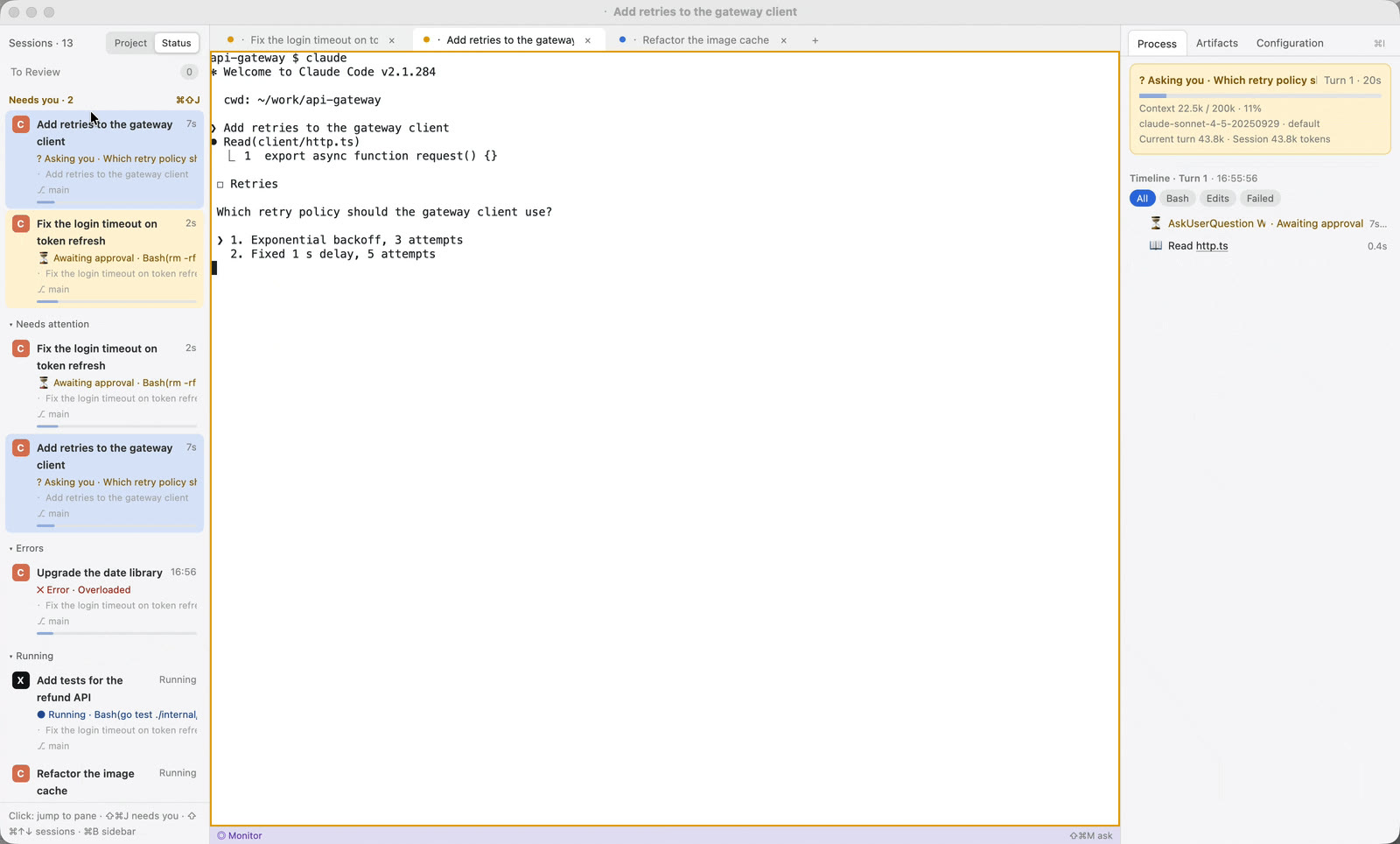
The first time a session needs you, macOS asks whether gilvt may send notifications; choose Allow. You can change it later in System Settings → Notifications → gilvt.
Try it: download gilvt (free, macOS 11 or later), run claude in a pane, ask for something that needs approval and switch to another app.