 gilvt
gilvtRecommended setup: give each Claude Code session its own Git worktree, one narrowly defined task, and a visible session title. Use tmux when the process must survive disconnects; use an agent-aware terminal when the main problem is knowing which session needs attention.
1. Give each session an isolated working tree
Two agents editing the same checkout can overwrite files, invalidate each other's assumptions and produce a mixed Git diff. Git worktrees provide separate directories while sharing the repository object database.
git worktree add ../project-auth -b agent/auth
git worktree add ../project-tests -b agent/tests

cd ../project-auth
claude
Start the second session from the other worktree. Keep each branch focused enough that its result can be reviewed and merged independently.
2. Assign outcomes, not overlapping activities
“Improve the backend” is a poor parallel task. “Add request validation to endpoint X” and “add regression tests for issue Y” establish ownership. Before starting another session, define:
- the expected result;
- the files or subsystem it owns;
- what it must not change;
- the command that proves completion.
If two tasks must touch the same central file, sequence them or designate one Agent as the owner and give the other a research-only task.
3. Make sessions identifiable
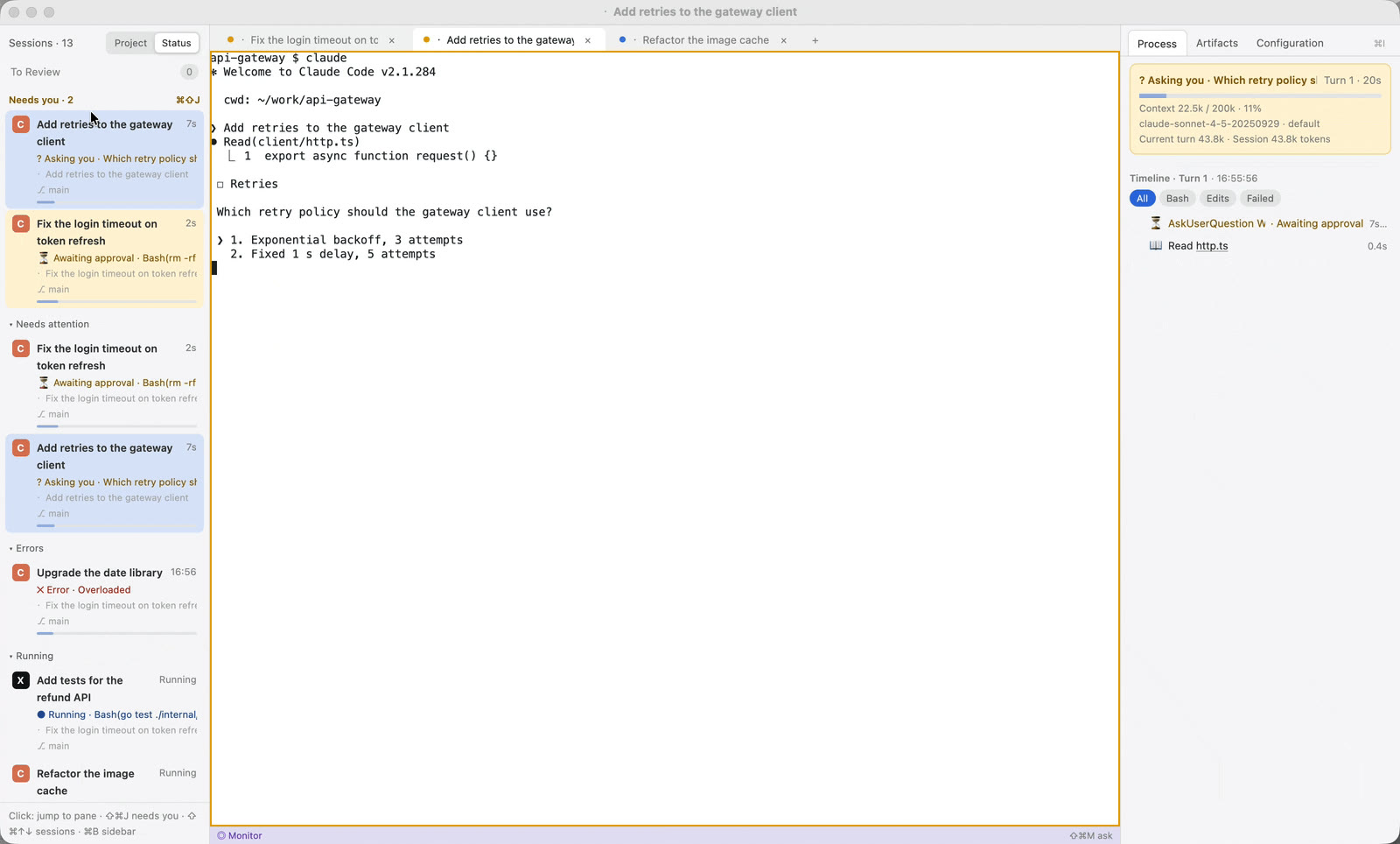
A terminal title such as “zsh” is not enough when six sessions are open. Include the project, task and branch in the session identity. In gilvt, session rows show the working directory, branch and current action, and can be renamed without changing the underlying Agent session.
4. Centralize attention instead of polling tabs
The expensive part of parallel Agent work is repeatedly checking whether each session is still running. Claude Code hooks and session records can distinguish activity from approval requests, questions, errors and completed turns.
gilvt groups sessions that need the user at the top of the sidebar. ⇧⌘J jumps to the next waiting session across tabs and windows, while native notifications cover the time spent in an editor or browser.
5. Review one turn before giving the next instruction
Parallel output accumulates quickly. Review by task and turn instead of waiting for every branch to become large. Check the commands run, the changed files, the relevant diff and the verification result. Commit or checkpoint accepted work before sending a materially different request.
6. Choose persistence deliberately
Claude Code can resume durable sessions, while tmux can keep the exact running process alive. These are not the same:
- Claude resume reconstructs the Agent conversation from its saved session.
- tmux attach reconnects to the same shell and process, provided the tmux server is still running.
- gilvt restore rebuilds the local window layout and offers supported Agent sessions for resume.
Use tmux on remote machines or for processes that must survive a GUI exit. Use Agent resume for durable conversation history. The two can be combined.
7. Limit concurrency
More sessions are not automatically faster. Start with two or three independent tasks. Increase concurrency only while review latency remains low and tasks do not contend for the same files, tests or mental model.
With gilvt: press ⇧⌘N to create a Claude Code session in a directory or fresh worktree, then use the sidebar and Session Center to navigate, review and resume it.