 gilvt
Short version: review after every turn, not at the end; start each task from a clean or committed tree so the diff is only the agent's work; use /diff in Claude Code or Codex for the current state and git for history. When you run several sessions, or want to look back at a turn after the session ended, you need per-turn snapshots that are kept for you.
Review each turn, not the whole branch
An agent can change a dozen files in one turn and build the next turn on top of them. If you only look at the final diff, a wrong assumption from turn two is buried under everything that followed. Reading each turn while it is small is faster, and you can redirect the agent before it builds on a mistake.
Each turn, check four things: the commands it ran (and whether any failed), the files it changed, the diff itself, and the result of the verification it claims, such as the test run.
With git
Git works with any agent. Start each task from a committed tree, so the working-tree diff contains only the agent's changes:
git status --short          # what changed, including new files
git diff --stat             # size of the change per file
git diff                    # the changes to tracked files
git diff --word-diff        # word-level changes for prose and config
git add -p                  # accept the turn hunk by hunk
Two habits make this work well. Commit (or stage) what you accept after each turn, so the next git diff is only the new turn. And remember that git diff does not show files that are not tracked yet: new files appear in git status, not in the diff.
With the agents' own commands
| Claude Code | Codex CLI | |
|---|---|---|
| See the changes | /diff: the working tree's changes, including Claude's edits so far | /diff: the git diff, including files git isn't tracking yet |
| Have it review | /review (alias of /code-review) | /review, or codex review --uncommitted |
| Undo a turn | Esc Esc or /rewind: restore code, conversation or both to a checkpoint | Use git |
Claude Code's checkpoints are convenient but are not version control: files changed through Bash commands (rm, mv, cp) and edits made outside the session are not restored. Keep committing. See the checkpointing docs and the Codex slash commands.
Where this gets hard
- Several sessions. Each agent's
/difflives in its own pane. With four sessions in four worktrees, you review in four places, and you have to remember which ones finished since you last looked. - After the session. Once you have closed a session or started the next task, “what did turn 3 change?” means digging through git history, if you committed in between.
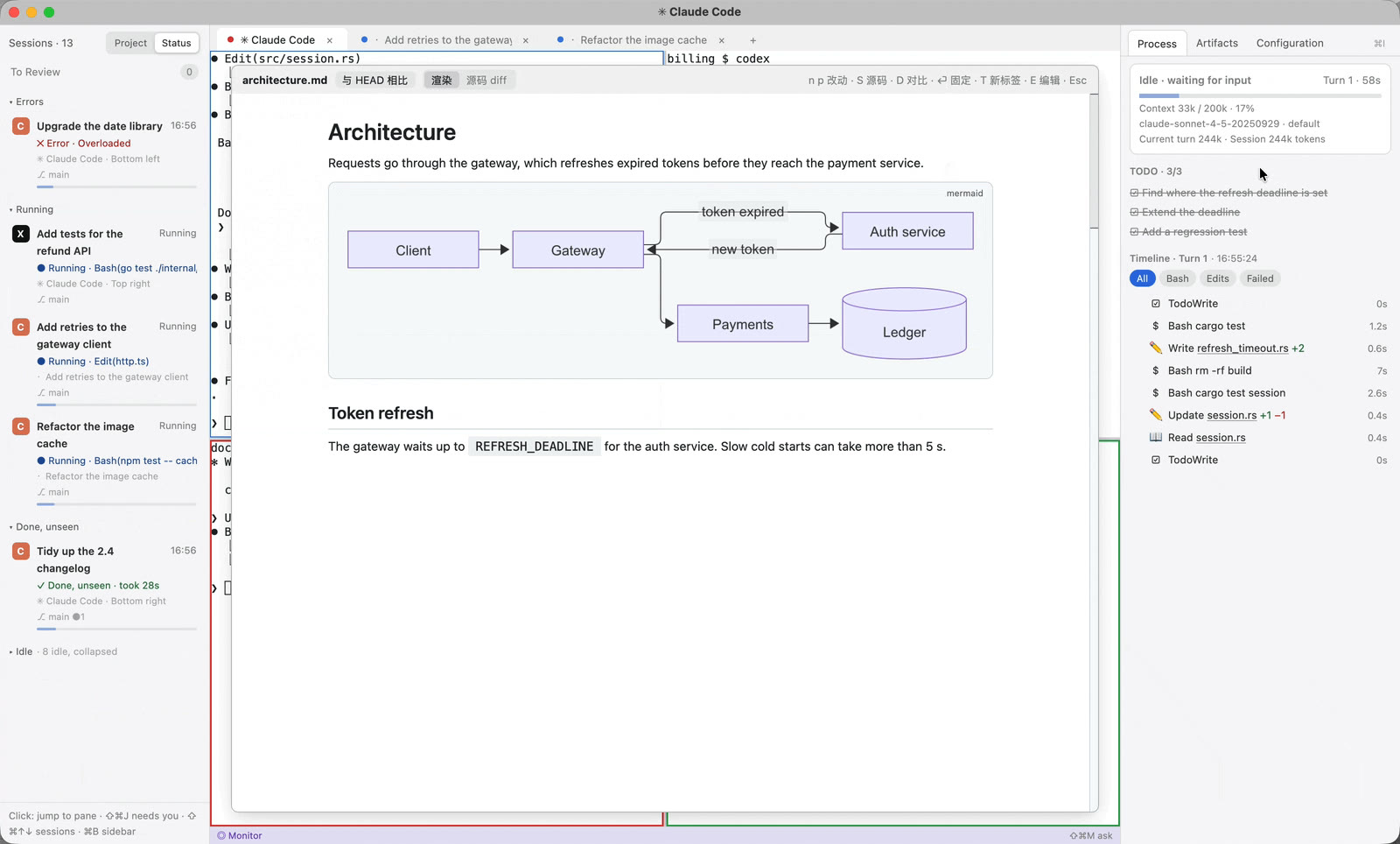
- Documents. Agents increasingly write design notes, READMEs and Mermaid diagrams. A raw diff of Markdown is hard to read; you want to see the rendered document with the changed blocks marked.
- Small fixes. Fixing one line the agent got wrong usually means opening an editor, which may already be fighting the agent over the same file.
How gilvt does it
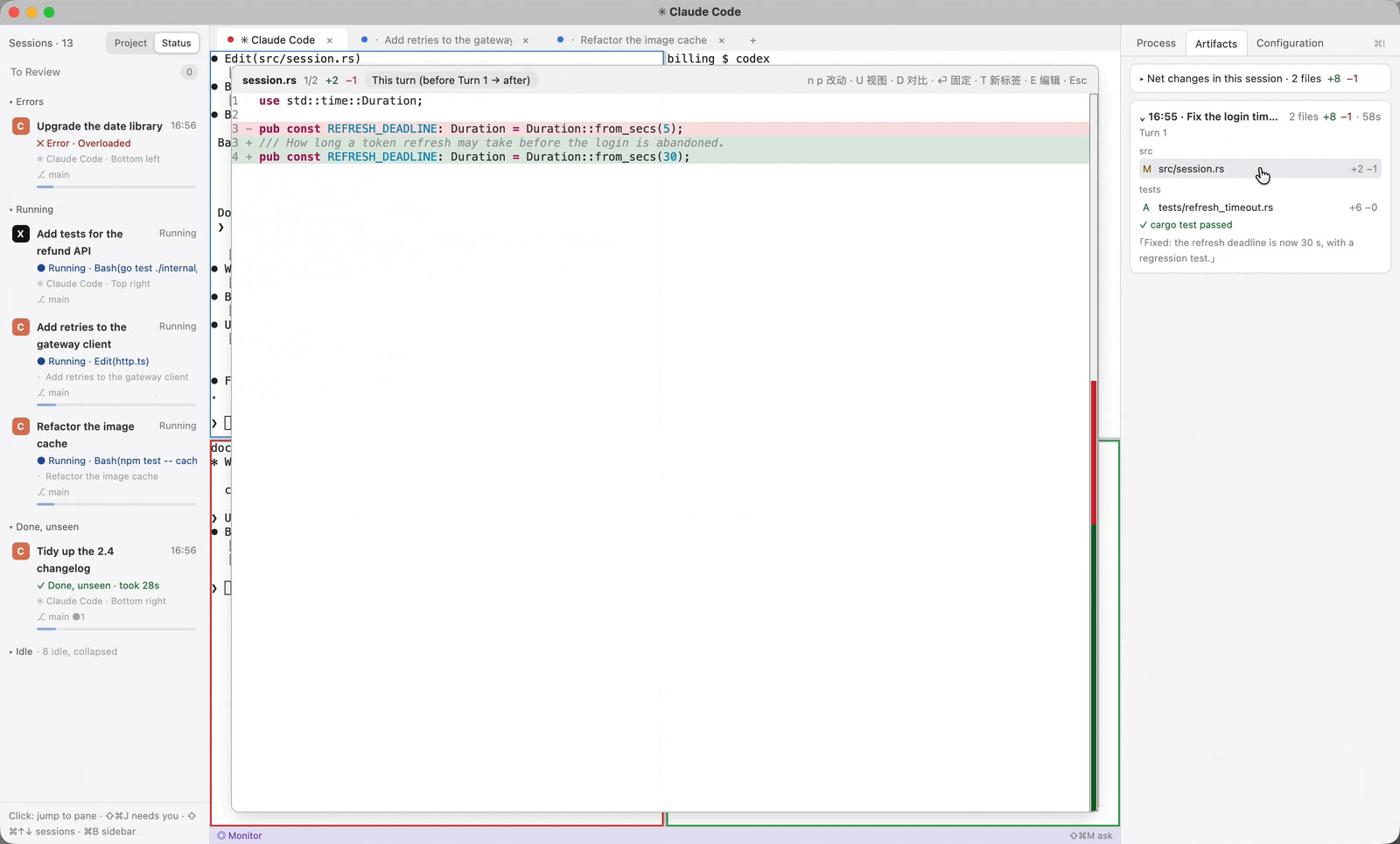
gilvt is a macOS terminal that tracks the Claude Code and Codex sessions running in it. At the start and end of every turn it snapshots the working tree in its own directory (it does not touch .git, the index or your commits), so every turn's changes stay available, including new untracked files.
- Process timeline (⌥⌘1): each turn's commands, edits and failures; failed commands show their key error lines. Click a row to scroll the terminal back to it; ⌘-click a file name to open it.
- Artifacts (⌥⌘2): one card per task with the files it changed and
+a −b. Open a file for the diff of this turn, this task or the whole session, with line counts that match the card. - Quick Look: syntax-highlighted, word-level diffs, unified or side by side, n / p between hunks. Markdown is shown rendered, with added and changed blocks marked; Mermaid diagrams render offline.
- From the shell:
gilvt diffsteps through every file changed against HEAD (gilvt diff mainagainst a branch),gilvt view file:42opens one, and ⌘P finds any file in the repository. - Fix it in place: press E in a preview to open the built-in editor next to the terminal. If the agent changes the file while you edit, gilvt shows a reload / compare / overwrite bar instead of silently overwriting either side.
- To Review (⇧⌘R → ⌘2): finished turns from every session go into one queue, failures first. Read the prompts, the agent's final answer and its tool calls without restarting the agent, then mark it reviewed.
When you still want the IDE
gilvt covers reading and small edits. It is not an IDE: the editor has no code completion or go-to-definition and no find and replace yet, and text in Quick Look cannot be selected yet. For a larger rework, ⌘⌥O opens the file at the current line in your external editor (VS Code when code is installed). Per-turn snapshots and the Artifacts tab work in git repositories on your Mac; for sessions on SSH hosts, use gilvt diff in the remote shell.
Try it: download gilvt (free, macOS 11 or later), run claude or codex in a git repository, and press ⌥⌘2 after the first turn.